





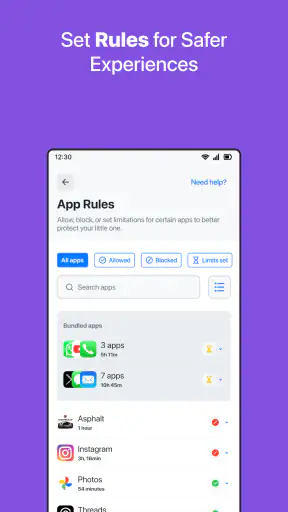
When I look at a parental-control app, I am not only asking whether it can block something. I want to know what happens on a normal school day: when a child picks up a phone, when a parent gets a warning, when a rule needs changing, and when everyone is tired and wants the technology to stay out of the way. That is the angle I used with Safes - Parental Control, a free parenting app from SternX Technology GmbH.
Its purpose is straightforward: help parents manage a child’s online safety from a central place rather than relying only on conversations or the settings built into each individual device. The app is available to an Everyone audience, runs on Android devices using version 7.0 or later, and has passed the million-install mark. Those details make it easy to try, but the experience is more nuanced than the simple promise of “keep kids safe online.”
I found it most useful as part of a family routine, not as a magic shield. It can give a parent more visibility and a more consistent way to apply boundaries, but it still needs careful setup, honest discussion with the child, and occasional maintenance. The average rating of 2.9 from roughly seven hundred ratings also suggests that expectations matter here: some families may find the idea valuable while others may be frustrated by setup, reliability, or the limits of automated control.
From a worried parent to a workable daily routine
Starting with the real problem
The best starting point is not “I need to control everything.” It is a specific concern. Perhaps a child is staying online too late, using a phone during homework, visiting unsuitable places on the internet, or moving between several devices without a clear routine. Defining that concern first makes Safes easier to judge because parental control works better when the family knows which behavior it is trying to change.
I would begin by explaining the purpose before handing over a device. A child who hears only that an app is being installed may see it as secret surveillance. A child who understands that the goal is bedtime, school focus, or safer browsing is more likely to accept the arrangement. This conversation is not a side issue; it determines whether the app becomes a useful boundary or a source of daily arguments.
Safes is positioned as a parenting tool rather than a general security utility. That distinction matters. I would not install it expecting antivirus protection, a replacement for teaching digital judgment, or a complete answer to every social-media problem. Its value is in helping a parent organize supervision and restrictions around a child’s device use.
Setting up the family workflow
The first practical task is to identify who is managing the rules and which child or device the rules concern. Parents should use an account arrangement that they can maintain themselves, rather than creating a setup that depends on the child remembering passwords or approving every future change. I also recommend writing down the family’s basic rules before opening the settings: when devices are used, what happens during schoolwork, and what the child should do if something upsetting appears online.
That preparation exposes an important trade-off. A highly restrictive setup may feel reassuring on the first day, but it can create constant requests for exceptions. A lighter setup may require more conversation, yet it is often easier to live with. I prefer starting with a small number of rules that solve the immediate problem, then adjusting after several days. This gives the parent a chance to distinguish a genuine safety need from a temporary worry.
Because the current version is 3.1.6, the interface may not look exactly like older screenshots or instructions found elsewhere. I would therefore follow the screens shown during installation rather than relying on a remembered guide. The app is free to download, while in-app purchases range from $5.99 to $59.99 per item, so I would also review any upgrade screen carefully before confirming a purchase.
Applying rules without turning the phone into a battleground
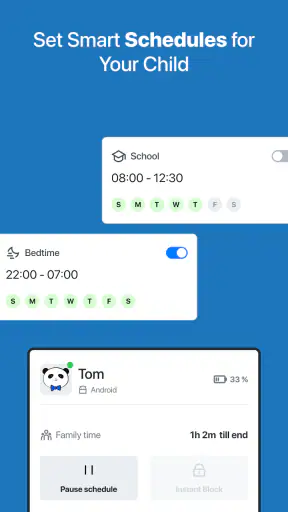
Once the family arrangement is clear, the next step is to apply the controls gradually. The useful question is not “Can I block as much as possible?” but “Which rule should happen automatically so that we do not have the same argument every evening?” A bedtime boundary, for example, is easier to explain when it is agreed in advance than when a parent suddenly takes the phone away after noticing late-night use.
I would test the setup while the child is nearby. Check what happens when a normal activity is restricted, whether a parent can understand the resulting notification or message, and whether the child knows how to ask for help. This test is one of the less obvious but most important steps: a rule that works technically but produces confusing feedback will lead to repeated interruptions and requests for manual intervention.
Another useful habit is to keep an exception process simple. If a child needs access to something for homework, travel, or a family event, the parent should know how to review that request and return to the normal rule afterward. The point is not to remove every exception. It is to prevent one temporary change from quietly becoming the new permanent arrangement.
The handoff between parent, child, and device
Parental-control apps succeed or fail at the handoff. The parent decides what is appropriate, Safes applies or communicates the rule, and the child experiences the result on the device. If any part of that chain is unclear, the family may blame the wrong thing. A child may think the phone is broken, while the parent assumes the rule is working exactly as intended.
I would describe the app to a child in plain language: what is being limited, why the limit exists, and how to contact the parent when something legitimate is blocked. That approach makes the app part of a visible family agreement instead of a hidden mechanism. It also gives the child a chance to point out problems, such as a school resource being treated like entertainment or a necessary activity being interrupted.
Parents should also agree on who handles requests. In a two-parent household, inconsistent decisions can make the system feel arbitrary. One adult may approve an exception while another expects the original rule to remain in place. A shared routine for reviewing requests is more important than having a large number of controls. Safes can support the structure, but it cannot resolve disagreements between adults.
A realistic school-night example
Imagine a child returning home with a phone, finishing dinner, and needing the device for a short homework task. The parent wants the phone available for that task but not for endless browsing afterward. I would set the family expectation before homework begins, let the child use the device for the agreed purpose, and then check the handoff when study time ends. If Safes interrupts an allowed activity, the parent can use that moment to inspect the rule rather than simply accusing the child of ignoring it.
The outcome I would look for is not a perfectly silent evening. It is fewer repeated negotiations. The child knows when the device is appropriate, the parent has a consistent way to supervise, and an exception can be handled without abandoning the whole arrangement. That is a realistic standard for this kind of app and a better measure than how many controls appear in a menu.
What the parent sees after setup
The main benefit of a dedicated parental-control app is consolidation. Instead of depending entirely on separate settings inside browsers, operating systems, video services, and individual games, a parent can approach the child’s online routine through one parenting-focused tool. That can make the overall plan easier to remember, especially for families managing more than one child.
Still, consolidation should not be confused with total coverage. A child may use another device, a guest profile, a friend’s phone, or an account the parent has not included in the family setup. The app is therefore strongest when it supports an agreed device routine. It is weaker when a parent expects one installation to identify every online activity across every possible route.
I also see value in using the app as a review tool rather than checking constantly. A parent can establish a rule, observe where the routine creates friction, and make one thoughtful adjustment. Repeatedly opening the app to inspect every small action may increase family tension without improving safety. The technology should reduce mental load, not turn the parent into a full-time monitor.
Where the flow breaks
The first likely break is setup complexity. Parental control involves at least two perspectives: the adult who creates the rule and the child who lives with it. If device roles, permissions, or expectations are misunderstood, the parent may believe a protection is active when the family is actually relying on a different setting. I would never assume that installation alone means the job is finished.
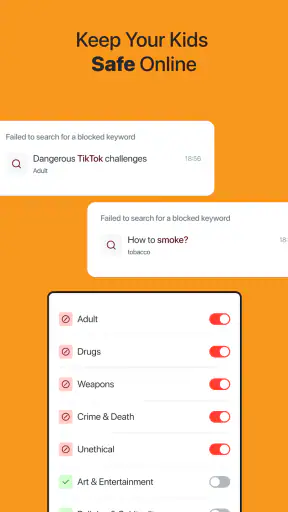
The second break is overblocking. Automated restrictions cannot understand every context as well as a parent can. A page that looks unsuitable in one situation may be needed for a school assignment; a time limit that makes sense on weekdays may be awkward during a trip. The more aggressively the app is configured, the more important it becomes to provide a clear way for the child to explain a legitimate need.
The third break is trust. Some children will accept supervision, while others will treat it as evidence that they are not trusted. Safes cannot solve that emotional response. Parents who want completely invisible monitoring should think carefully about whether this is the right direction for their family. In many cases, transparent rules and regular conversations are healthier than trying to make control unnoticed.
There is also a practical financial consideration. The app itself is free, but optional purchases can cost from $5.99 to $59.99 per item. I would not pay for an upgrade simply because a feature sounds comprehensive. First, I would use the free experience to identify the actual gap in the family routine, then decide whether the purchase addresses that gap clearly enough to justify the cost.
Who should choose it, and who should look elsewhere
I think Safes is worth considering for parents who want a dedicated parenting app, prefer a central approach to online boundaries, and are willing to participate in setup and follow-up. It may suit a family that is moving from informal rules to a more consistent routine, particularly when the main issue is device use rather than a need for specialist intervention.
I would be more cautious if your priority is a very simple, built-in solution. The controls already included with Android or iOS may be a better starting point when you only need basic screen-time limits or app restrictions and do not want another service to manage. A child who uses several platforms may also require separate account-level settings, because no single parental-control app should be treated as a universal substitute for those tools.
Families dealing with serious safety concerns should use broader support as well: direct supervision, school guidance where appropriate, and platform reporting tools. An app can help structure access, but it cannot replace an adult responding to bullying, grooming, self-harm content, or an immediate threat. In those situations, the human response matters more than the dashboard.
My overall experience
What I like about Safes is the possibility of turning vague parental anxiety into a repeatable workflow: define the concern, set a reasonable boundary, explain it to the child, observe the result, and revise only when there is a real reason. That process is more valuable than simply collecting restrictions. The app’s parenting focus gives families a framework for that conversation.
What holds it back is the amount of responsibility that remains with the parent. A low average rating indicates that the experience has not been universally smooth, and the presence of optional purchases means users should pay attention during the upgrade path. I would also avoid promising a frictionless setup, because parental-control software naturally creates moments where a rule, a device, and a real-life exception collide.
My recommendation is to try the free version with one clearly defined family goal, test it together with the child, and judge it by the outcome of that routine rather than by the number of settings available. If it reduces repeated arguments and helps the parent respond consistently, it may earn a place in the family’s digital habits. If it creates more confusion than clarity, the simpler controls already available on the phone may be the better choice.
In the end, Safes - Parental Control works best as a practical assistant for involved parents, not as an invisible substitute for parenting. I would recommend it to families prepared to explain boundaries, review exceptions, and accept that online safety is an ongoing conversation. Used that way, it can add structure; used as a guarantee, it will disappoint.


